
No stack required. Scans become email.

For the people who don't live in Slack and will never open a dashboard: each click or QR scan arrives as a plain, readable email — what was scanned, where it points, when and from what device. The client, the site manager, the shared alerts@ inbox.

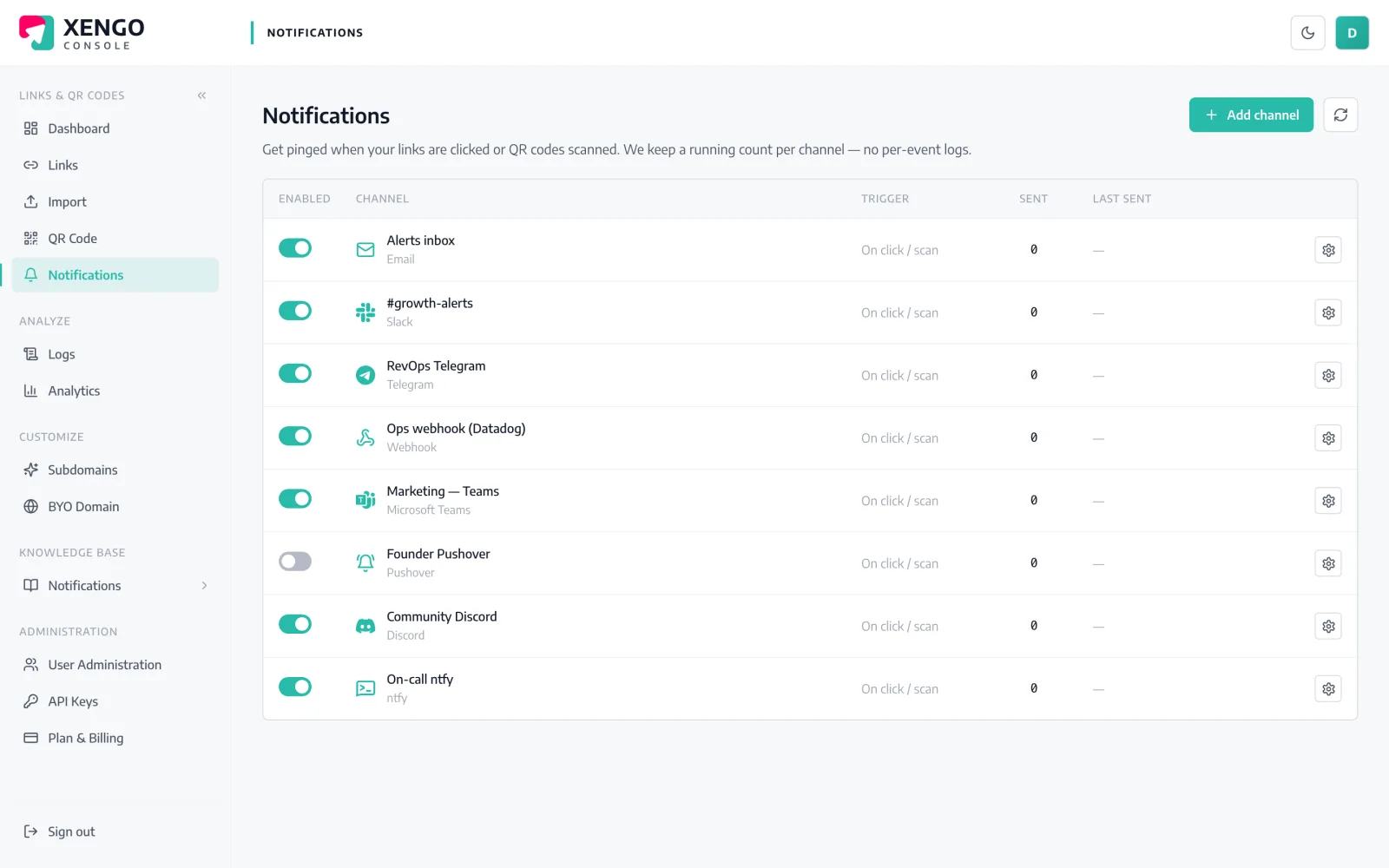
Email channel set-up in the xengo console
An address, a confirmation, done

The recipient says yes before anything sends.

Email channels are double opt-in by design: entering an address sends one branded confirmation email, and not a single alert goes out until its owner clicks confirm. Nobody can point our alerts at an inbox that didn't ask for them — including you, which is exactly the point.

  1. 1

    Pick the inbox

    Decide who should hear about scans: your own address, a client's, or a shared inbox like alerts@yourco.com that the whole team reads. Any address works — it just has to be able to click one link.

  2. 2

    Add the channel in xengo

    Console → Notifications → Add channel → Email. Enter the address in the Email address field and save — a branded confirmation email goes out with a link that's valid for 24 hours. Once it's confirmed, hit Send test.

  3. 3

    Choose what it hears

    Attach the address to the links and QR codes it should hear about — every link you run, or just one campaign's codes. The client only ever hears about their own campaign, not your entire account.

Confirmed, paused, counted — at a glance

Confirmed, paused, counted — at a glance

Email sits on the same Notifications page as the other 23 channels. You can see whether an address has confirmed, resend the confirmation if it expired, watch the send count tick, and pause the channel without deleting it.

  • Confirmation status visible per address
  • One click to resend an expired confirmation
  • Pause and resume without losing configuration
Each recipient hears only their links

Each recipient hears only their links

Attach an email channel to individual links and QR codes and it receives exactly that traffic. One address per client, one per site, one per campaign — the inbox defines the audience, the routing defines the story.

  • Per-link and per-QR routing, chosen code by code
  • Mix freely — email the client, webhook your own systems
  • Change routing any time; takes effect on the next scan

The details that make it dependable

Double opt-in, always

A new email channel starts unconfirmed and cannot deliver until the recipient clicks the confirmation link. Ignoring the email means nothing is ever sent.

24 hours, then resend

The confirmation link expires after 24 hours. If it lapses, one click in the console sends a fresh one — no need to recreate the channel.

Change address, reconfirm

Editing a channel's address resets it to unconfirmed and triggers a new confirmation — you can't quietly redirect an opted-in channel to a new inbox.

Never retried, on purpose

Email is the one channel we never retry: mail infrastructure has its own delivery semantics, and a late duplicate alert is worse than a bounce you can see.

Reads anywhere

The alert itself is a clean plain-text summary — title, short URL, source, destination, time, device, tags — that renders in every client, from Outlook to mutt.

Logged like every channel

Each send is recorded in the delivery log alongside your other channels, so 'did the client get the email?' has a factual answer.

Frequently asked questions

Why hasn't my email channel started sending?

Almost always because the address hasn't been confirmed yet. Every email channel starts unconfirmed and sends nothing until the recipient clicks the link in the confirmation email — check spam, and if the 24-hour link has expired, use the resend option in the console. Editing the address also resets confirmation, by design.

Can I send scan alerts to someone outside my organisation?

Yes — a client, a venue manager, a printer checking their proofs. Enter their address and they receive the confirmation email; alerts only start once they click confirm, so you're never signing someone up without their say-so.

What does each alert actually contain?

A subject naming the short link, and a readable summary: the link's title, the short URL, the source (direct click, QR scan, NFC tap), the destination, the time in UTC, and — where available — the device, referrer, IP and your custom tags. Enough context to act on without opening the console.

Are failed email deliveries retried like webhooks?

No — deliberately. HTTP channels get up to six attempts on a backoff ladder; email gets exactly one send per event, because mail systems queue, grey-list and bounce on their own schedule, and a duplicate alert arriving an hour late causes more confusion than it cures. If you need retried, verifiable delivery, pair the address with a signed webhook — the same scan can feed both.

Do I need a paid add-on for email alerts?

No — email alerts are included on every plan. Webhook and automation channels, with signing, retries and the delivery log's full depth, come in from the Pro plan; email is the floor everyone gets.

More webhook & email

One platform. Everything a link should do.

Smart URLs, dynamic QR codes and a full API — branded on your own domain, safety-screened, and tracked. Build, re-point and measure it all in one place.

Start free trial
1,284 clicks
go.acme.com/spring
1 London 412
2 Manchester 168
3 Bristol 94

Smart URLs

Branded short links on a domain you control — editable, screened, and tracked.

Popular Smart URLs features

  • Your own custom domain, auto-HTTPS
  • Re-point live links without reprinting
  • Every destination safety-screened
  • Honest, bot-filtered analytics

Dynamic QR

Branded QR codes you can re-point any time — never reprint the poster again.

Popular Dynamic QR features

  • Editable destination behind every code
  • Your brand colours + logo
  • Real-time scan alerts
  • Per-code scan analytics
$ curl -X POST api.xengo.io/v1/links
{
  "domain": "go.acme.com",
  "url": "https://acme.com/…"
}
→ 201 go.acme.com/aB3xK

API

Create and manage links + QR at scale, straight from your own tools.

Popular API features

  • REST API with scoped keys
  • Bulk-create thousands of links
  • Programmatic QR generation
  • Webhooks + click / scan alerts

Give someone their inbox alert today

14-day free trial, card required, cancel anytime. One address, one confirmation click, and the next scan lands as an email.