
The moment they scan, your server knows.

Merch table QR, link-in-bio, ticket drop, sticker on a lamppost — the instant it's used, a message hits the Discord channel you chose, with the code, the destination, the time and the device. Your community team sees it live instead of discovering it in next week's analytics.

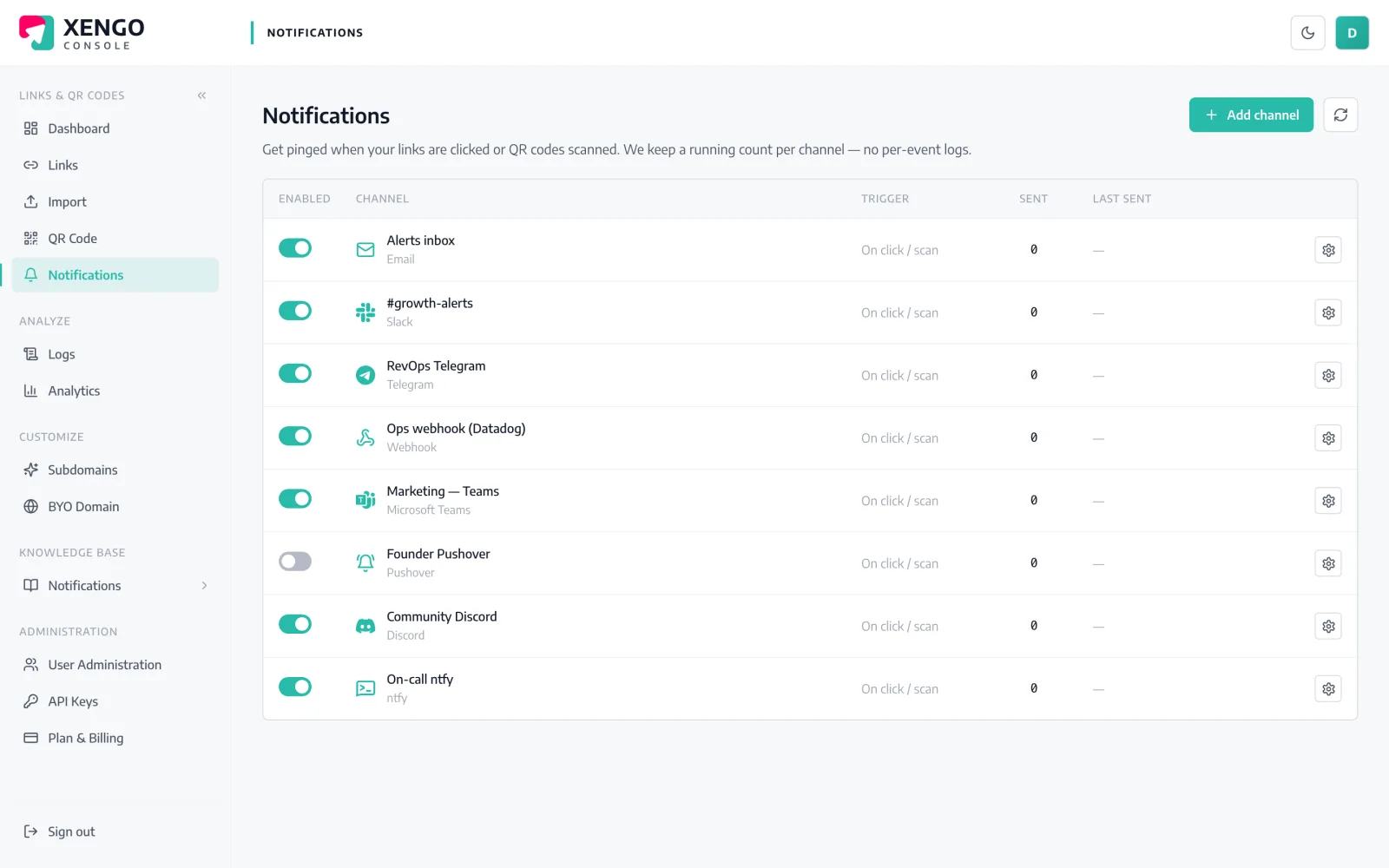
Discord channel set-up in the xengo console
No bot to invite

A channel webhook. That's the whole setup.

Discord webhooks are built into every server — no bot to add, no permissions to scope, no slash commands to learn. If you can edit a channel, you can have scan alerts in it two minutes from now.

  1. 1

    Create a webhook in Discord

    Server Settings → Integrations → Webhooks → New Webhook (or Edit Channel → Integrations on the channel itself). Pick the channel, name it, set its avatar if you like, and copy the webhook URL.

  2. 2

    Add it in the xengo console

    Console → Notifications → Add channel → Discord. Paste into the Webhook URL field, name the channel, save — then hit Send test and watch it post to the server.

  3. 3

    Route codes to channels

    Attach the webhook to the links and QR codes it should hear about — merch codes to #merch, event posters to #events, mod-only codes to a private channel. Routing is per link, so each code posts only where you pointed it.

Every webhook, one console page

Every webhook, one console page

Each Discord destination is its own named channel on the Notifications page — with a send count, a last-delivery timestamp and a pause switch. Run one for the public server and another for the staff server without them tangling.

  • One xengo channel per Discord webhook, individually named
  • Pause a noisy channel during a drop without deleting it
  • Send test button to prove the wiring before launch day
Every code you print, accounted for

Every code you print, accounted for

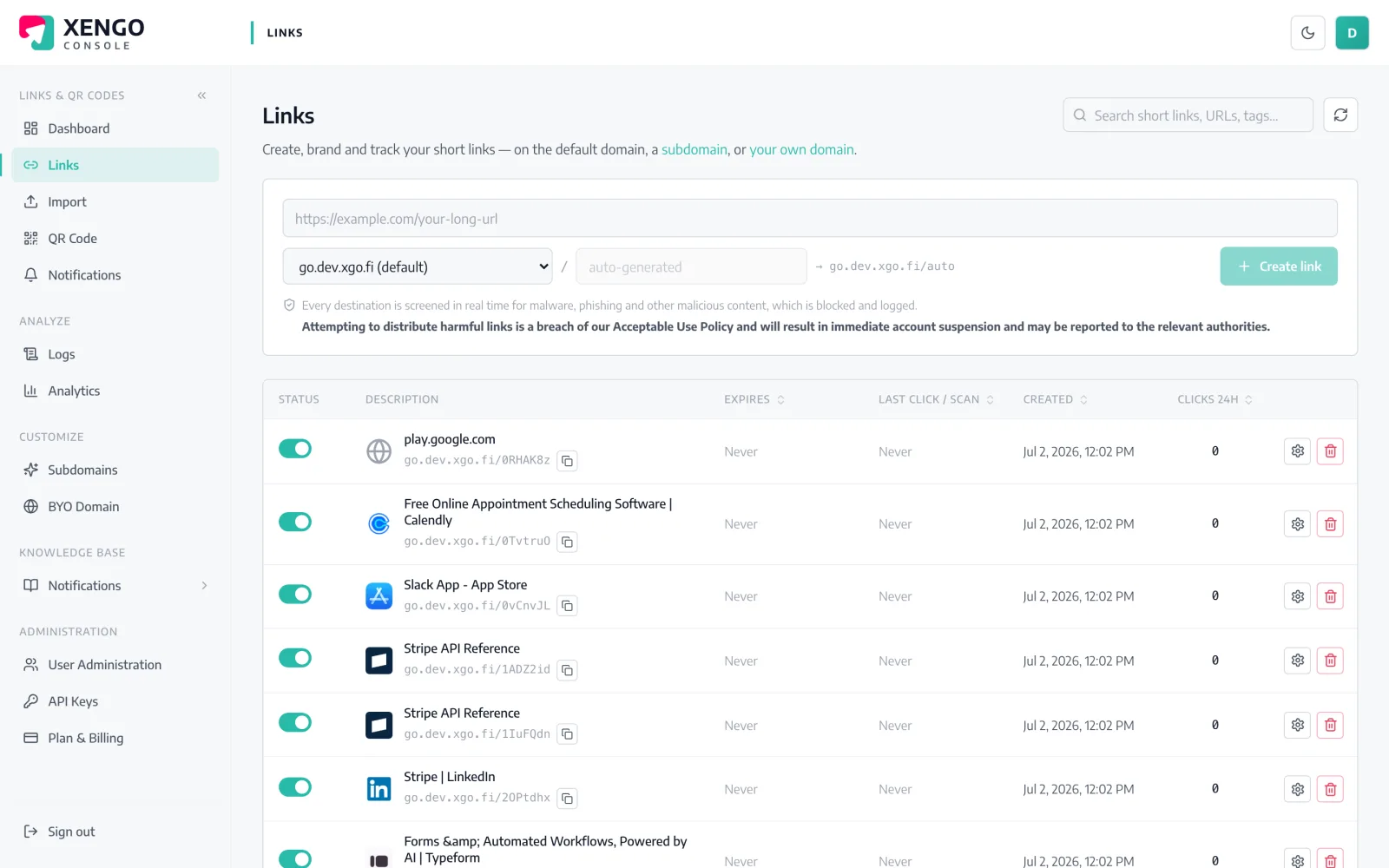
The links page shows every short link and QR code with its scan counts, so the Discord pings always trace back to a specific, named code — not a mystery URL someone made in a hurry.

  • Named links and QR codes with live totals
  • Tags for campaign, drop or venue travel into each message
  • Edit the destination later; the printed code keeps working

The details that make it dependable

Posted in seconds

From scan to server message is typically a couple of seconds — quick enough to greet the person still standing at your stall.

Readable at a glance

Code title, short URL, click vs QR scan, destination, timestamp, device and your tags — a message the channel can act on without asking questions.

Your webhook, your identity

The name and avatar the message posts under are set on the webhook in Discord — so alerts can look like your brand, not like plumbing.

HTTPS validated

Discord webhook URLs are checked at set-up and must be HTTPS, so a broken paste fails when you save it, not during the drop.

Failures retry themselves

A failed post goes onto a backoff ladder — up to six attempts across roughly 43 minutes — with every attempt logged.

Stacks with everything else

The same scan can also start a Zap, fire a signed webhook or push to your phone. Discord is a listener, not the only one.

Frequently asked questions

Do I need to add a bot to my server?

No. xengo posts through Discord's native channel webhooks, so there's no bot to invite, no role to configure and no OAuth screen. Anyone with Manage Webhooks permission on the channel can set it up.

Can I send different QR codes to different channels?

Yes. Create a webhook per channel in Discord, add each as its own xengo channel, and attach them per link or QR code. A public #drops channel and a private staff channel can hear about completely different codes.

What does the message actually look like?

A plain, readable message: the code's title, the short URL, whether it was a direct click or a QR scan, the destination, the time and the device, plus any tags you set. It posts under the webhook's own name and avatar. No embeds, no formatting surprises.

Is the Discord delivery signed or verifiable?

No — Discord webhooks are Discord-owned URLs that ignore extra headers, so signing them would prove nothing. If you're building something that must verify origin, use the signed generic webhook alongside the Discord channel; the same scan feeds both.

What happens during a Discord outage?

Each attempt is recorded in the delivery log with its response code, and xengo retries on a backoff ladder for up to six attempts. If Discord comes back inside that window, the message still lands — and either way, the log tells you exactly what happened.

More chat & messaging

One platform. Everything a link should do.

Smart URLs, dynamic QR codes and a full API — branded on your own domain, safety-screened, and tracked. Build, re-point and measure it all in one place.

Start free trial
1,284 clicks
go.acme.com/spring
1 London 412
2 Manchester 168
3 Bristol 94

Smart URLs

Branded short links on a domain you control — editable, screened, and tracked.

Popular Smart URLs features

  • Your own custom domain, auto-HTTPS
  • Re-point live links without reprinting
  • Every destination safety-screened
  • Honest, bot-filtered analytics

Dynamic QR

Branded QR codes you can re-point any time — never reprint the poster again.

Popular Dynamic QR features

  • Editable destination behind every code
  • Your brand colours + logo
  • Real-time scan alerts
  • Per-code scan analytics
$ curl -X POST api.xengo.io/v1/links
{
  "domain": "go.acme.com",
  "url": "https://acme.com/…"
}
→ 201 go.acme.com/aB3xK

API

Create and manage links + QR at scale, straight from your own tools.

Popular API features

  • REST API with scoped keys
  • Bulk-create thousands of links
  • Programmatic QR generation
  • Webhooks + click / scan alerts

Let the server hear the next scan

14-day free trial, card required, cancel anytime. One webhook URL and the first test message is in your channel.